Aerodynamics Software for Conceptual & Preliminary Design
Flying Wing Design & Analysis Tutorial: Watch Video
The Aerodynamics Toolkit 🛠️ is a compilation of Lite Versions of our most popular aerodynamics software packages into a single subscription. Our goal is to give you all the tools needed to make you competitive in the business of aerodynamics conceptual analysis and design. Professionals and students will find this package indispensable as an analysis, design and reference tool throughout their academic and professional careers. It is currently available as a monthly or yearly subscription.
The Aerodynamics Toolkit contains:
3DFoil for wings, keels and hydrofoils aerodynamics/hydrodynamic analysis and stability. It is excellent for winglet/end-plate design and sizing.
MultiElement
Airfoils-Lite for interacting airfoils, slotted flaps, slats, car spoiler and wing in ground effect analysis. MutiElement Airfoils is used to quickly determine the airfoils shapes and gaps for winning rear wing spoiler designs.
VisualFoil
5.0 for isolated airfoil analysis/comparison, airfoil plotting and DXF exports.
📞 Please call or text us at (352) 653-0875 for more information.
Airfoil & 3D Wing/Hydrofoil Analysis Software
3DFoil
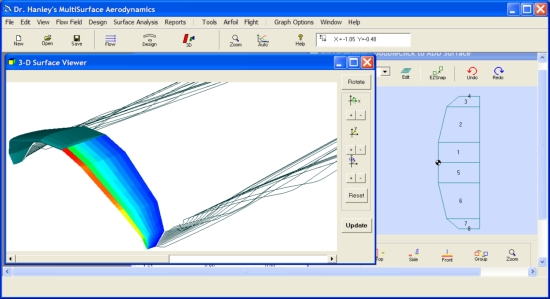
3DFoil is a lite version of
MultiSurface
Aerodynamics using 8 interacting surface. 3DFoil is based on a fast & accurate vortex lattice method (vortex rings formulation allows for geometric twist) and a novel approach that computes both profile and induced drag. Use 3DFoil to select airfoils, wing configurations, determine stability for your UAV, eVTOL, eSTOL, aircraft, hydrofoil and other projects.
3DFoil is a lite version of MultiSurface Aerodynamics using 8 interacting surface. 3DFoil is based on a fast & accurate vortex lattice method (vortex rings formulation allows for geometric twist) and a novel approach that computes both profile and induced drag. Use 3DFoil to select airfoils, wing configurations, determine stability for your UAV, eVTOL, eSTOL, aircraft, hydrofoil and other projects.
MultiElement Airfoils (Lite Edition)
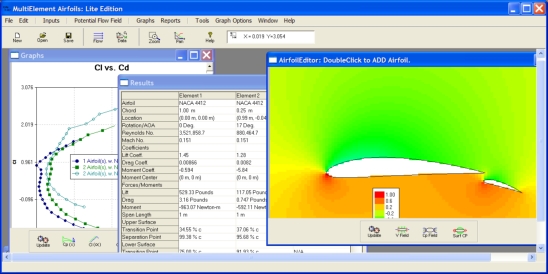
MultiElement Airfoils (Lite Edition) is a lite version of
MultiElement Airfoils
5. This version of the software does not solve the compressible Euler
& Navier-Stokes Solutions. It is powered by a linear strength panel flow solver
coupled with a boundary layer analysis for multiple interacting airfoils. MultiElement Airfoils is an excellent tool for selecting airfoils and quickly assessing the gaps between multi-element rear wing spoilers used by F1, FSAE and other race cars.
MultiElement Airfoils (Lite Edition) is a lite version of MultiElement Airfoils 5. This version of the software does not solve the compressible Euler & Navier-Stokes Solutions. It is powered by a linear strength panel flow solver coupled with a boundary layer analysis for multiple interacting airfoils. MultiElement Airfoils is an excellent tool for selecting airfoils and quickly assessing the gaps between multi-element rear wing spoilers used by F1, FSAE and other race cars.
VisualFoil 5.0 (Full Version)

VisualFoil 5.0 is a single airfoil analysis and library tool for
Windows XP, 7, 8 and 10. The software contains NACA 4, 5 & 6 digit generation
tools as well as the UIUC airfoils library. VF 5.0 also reads in .dxf files
and custom airfoil coordinates.
VisualFoil 5.0 is a single airfoil analysis and library tool for Windows XP, 7, 8 and 10. The software contains NACA 4, 5 & 6 digit generation tools as well as the UIUC airfoils library. VF 5.0 also reads in .dxf files and custom airfoil coordinates.
Featured Videos

Analyze Multiple Airfoils
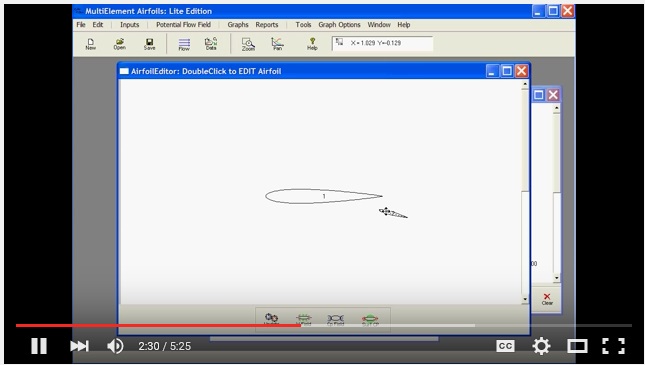
Find out how to analyze airfoils with flaps using MultiElement Airfoils (Lite Edition). Watch video.

About
Dr. Patrick Hanley is the owner of Hanley Innovations. He received his Ph.D. degree in fluid dynamics from Massachusetts Institute of Technology (MIT) department of Aeronautics and Astronautics (Course XVI). Read more ..
Products
3DFoil
MultiElement Airfoils
MultiSurface Aerodynamics
Stallion 3D
VisualFoil
VisualFoil PLUS
